
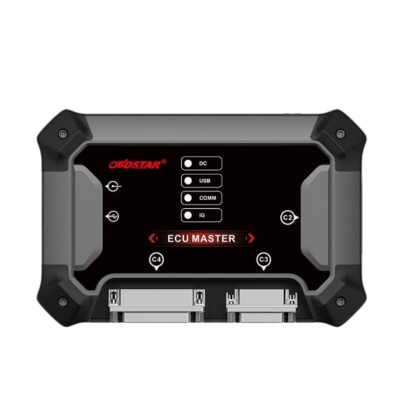
In the field of automotive electronic diagnostics and ECU programming, the OBDSTAR ECU Master has become an essential tool for professional repair technicians and tuning enthusiasts. As OBDSTAR’s first PC‑based professional ECU flashing device, it supports ECM/TCM/BCM cloning, reading, writing, and repair for passenger cars, electric vehicles, motorcycles, and heavy‑duty commercial vehicles. However, no matter how powerful the tool is, account and password management remains a fundamental aspect of daily use. Forgetting a password, updating personal information, or locating dealer support are all common scenarios. This article provides a comprehensive guide to resetting your OBDSTAR ECU Master account password and managing your personal information, based on official procedures and practical experience.
1. Overview of OBDSTAR ECU Master and the Importance of Account Management
The OBDSTAR ECU Master is a PC‑based device that connects via USB and runs on Windows 10 and later. It supports multiple working modes including OBD, BENCH, BOOT, BDM, and JTAG, covering major ECU brands such as Bosch, Continental, Delphi, Denso, and Siemens. Its core functions include ECU cloning, IMMO data decryption and conversion, VIN reading/writing, mileage calibration, and airbag reset.
Because these functions involve critical vehicle data, OBDSTAR employs a strict account authorization system. Each ECU Master device must be bound to a unique user account. Software updates, feature unlocks, and technical support all rely on this account system. Therefore, mastering password reset and account management is not only a basic skill but also a key factor in ensuring uninterrupted workflow.
2. Preparing for Password Reset
Whether you have forgotten your password due to a long period of inactivity or you simply want to change it for security reasons, OBDSTAR ECU Master provides a standardized password reset process. The entire operation can be completed independently from the software login interface without contacting customer service.
Before you start: Ensure that your computer is connected to the internet and can access OBDSTAR’s servers normally. It is recommended to use the email address you registered with, as the reset link will be sent there.
3. Step‑by‑Step Password Reset Procedure
Follow these three simple steps to reset your password:
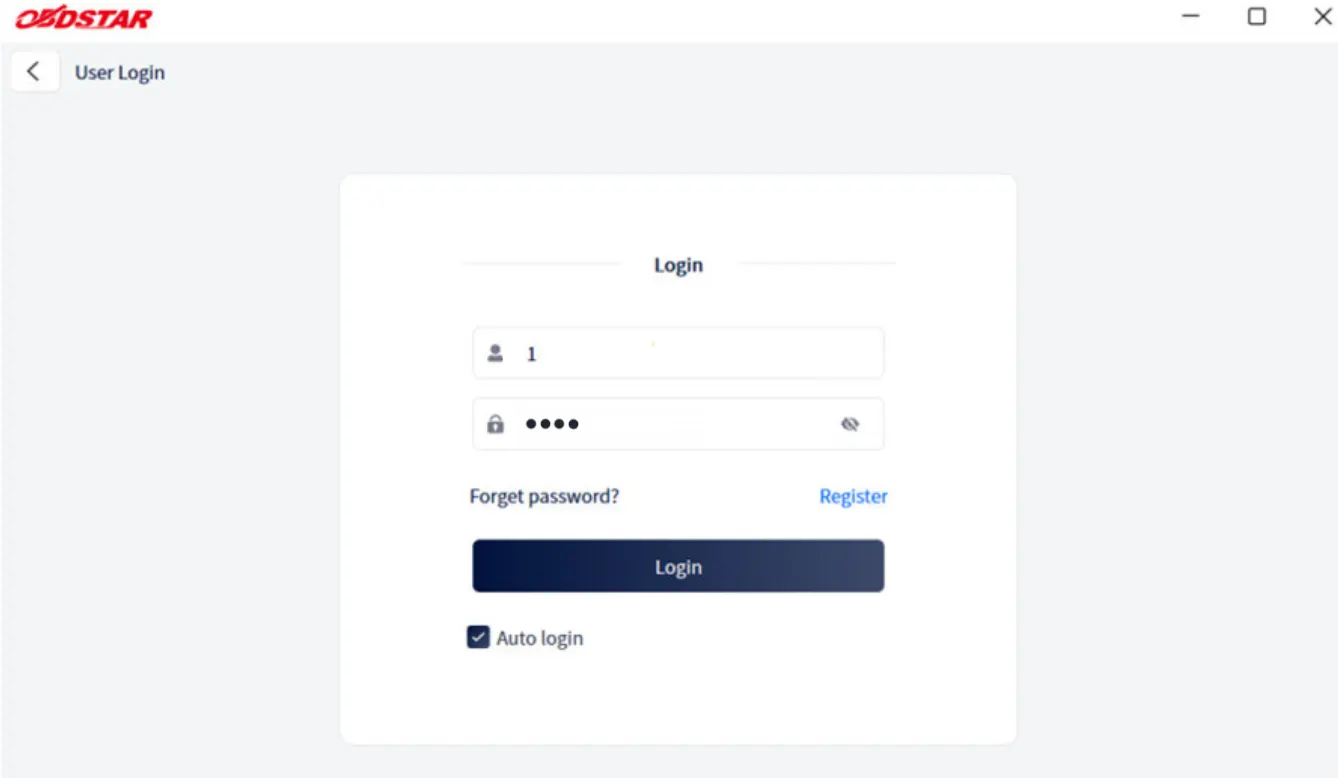
- Open the login interface: Launch the OBDSTAR ECU Master PC software. On the initial screen, click the "Personal Center" icon in the upper right corner to access the login window.
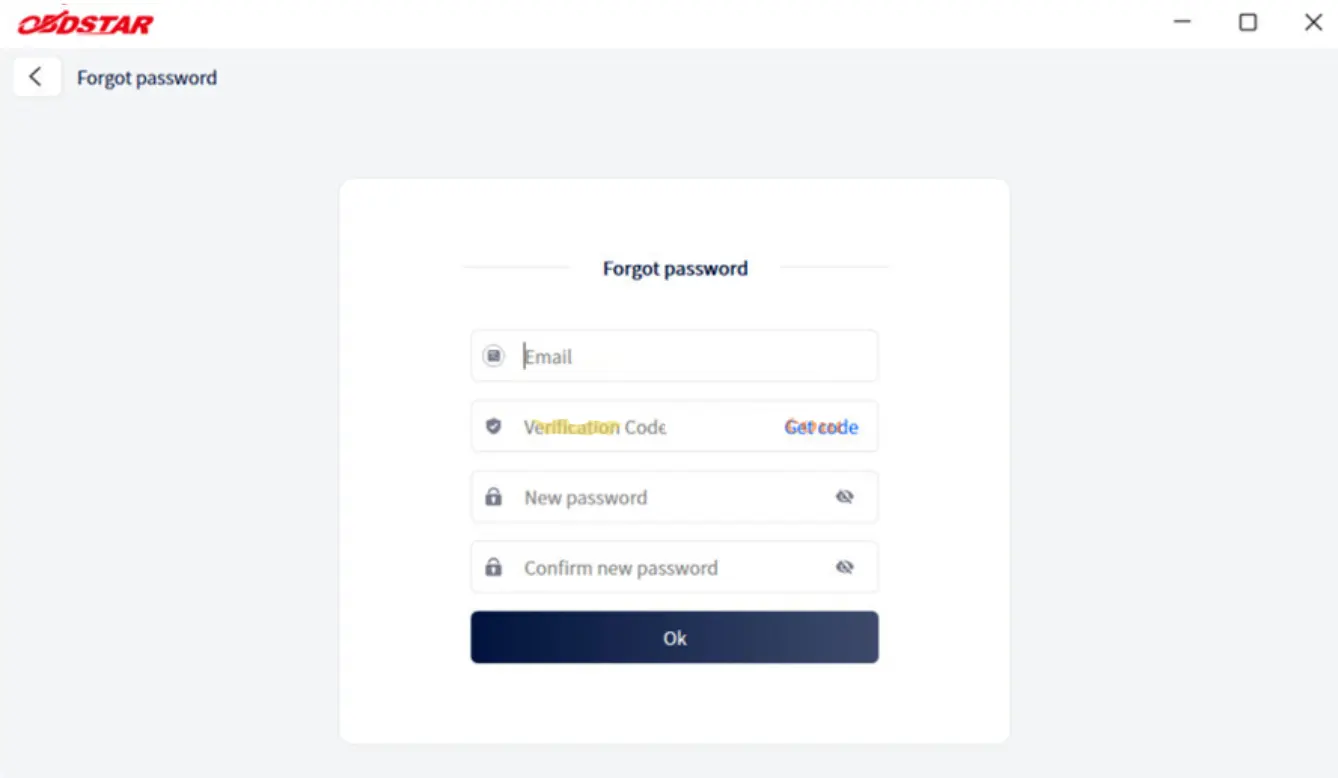
- Enter the password recovery page: Below the login box, find and click the "Forget password?" link. The system will automatically redirect you to the password recovery page.
- Fill in the required information and reset: Enter the email address or username you used during registration. The system will send a password reset link to that email address. Click the link in the email and follow the on‑screen instructions to set a new password. Make sure your new password is strong – at least 8 characters, including uppercase and lowercase letters, numbers, and special symbols.
Important note: If you do not receive the reset email after several attempts, please check your spam or junk mail folder. If the email still does not arrive, contact OBDSTAR official technical support with your device serial number for manual assistance.
4. After the Reset – What to Expect
Once you have successfully reset your password, you can log in to ECU Master using your new credentials. It is important to know that resetting your password does not affect any purchased software licenses or downloaded data packages. All your functional permissions and device binding status remain unchanged. You can continue using the device without any loss of features.
5. Managing Personal Information After Login
After logging in, you will be taken to the "My Info" personal center. This is not only a place to view basic account information but also the central hub for managing your contact details, security settings, and accessing technical support.
5.1 Viewing and Updating Your Profile
On the "My Info" page, the system clearly displays your username, registered email, dealer code, and other core information. If you need to update your shop’s phone number, address, or email, simply click the "Edit" button at the bottom of the page. Keeping your contact information up‑to‑date is crucial – OBDSTAR uses these details to send important software updates and security announcements.
5.2 Changing Your Login Password
For security reasons, it is advisable to change your password regularly. On the "My Info" page, click the "Change Password" button at the bottom, then enter your current password and your new password twice to confirm. Choose a strong password that is not easily guessed.
5.3 Finding Your Dealer and Technical Support
OBDSTAR ECU Master devices are distributed and supported through a regional dealer network. On the "My Info" page, find the "Dealer Code" field and click the "Show Info" button next to it. You will instantly see the direct contact information of your assigned dealer. Whether you need to report a device failure, purchase accessories, or ask functional questions, this channel provides fast and professional support.
6. Software Updates and Their Connection to Your Account
The software update function of OBDSTAR ECU Master is tightly linked to your account system. After logging in, go to the "Upgrade" main interface. All available updates are listed there. By default, all upgradeable software items are selected – grey checkboxes indicate mandatory updates (which cannot be deselected), while white checkboxes are optional. After making your selections, click the "Upgrade" button in the upper right corner to start downloading and installing.
OBDSTAR regularly releases ECU protocol library updates. For example, the latest version adds support for Audi Bosch MG1CS011 and BAIC Bosch MG1UA008 models. Timely updates not only expand vehicle coverage but also fix known issues and improve operational stability. All of this relies on a properly logged‑in account.
7. Frequently Asked Questions (FAQ)
- Q: Do I need to reactivate my device after resetting my password?
No. Password reset only changes your login credentials. The device’s authorization status and purchased functions remain unaffected. - Q: Can I change the email address registered to my account?
Yes. After logging in, click "Edit" on the "My Info" page to update your email address. It is recommended to use a frequently checked email so that you receive reset links and notifications promptly. - Q: What if I forget my username as well?
You can request your username by sending an inquiry to OBDSTAR official support using your registered email, or contact your dealer for assistance. - Q: Is the account for ECU Master the same as for X300 Classic G3?
No. These are separate product lines with independent account systems. You need to register and manage each account separately.
8. Final Recommendations and Best Practices
The password reset process for OBDSTAR ECU Master is designed to be simple and efficient – from clicking "Forget password" on the login screen to verifying through email and setting a new password takes only a few minutes. The "My Info" panel after login integrates profile updates, password changes, and dealer inquiries, offering a complete account management loop for daily use.
We strongly recommend that every user, after initial setup, securely store their registered email and password. Consider using a password manager and enable two‑factor authentication if available. Regularly changing your password (e.g., every three months) enhances security, especially if you work in a shared workshop environment. Always keep your software up‑to‑date to benefit from the latest features and security patches.
By following this guide, you can ensure that your OBDSTAR ECU Master account remains secure and functional, allowing you to focus on what truly matters – delivering accurate and efficient vehicle diagnostics and programming services to your customers.
Recent Comment